



Spotify voting scam exposed
NEWNow you can listen to News articles!
It all started with a simple favor. A friend asked for help voting so he could co-host a major podcast event with Spotify and Google. The first message seemed casual. It felt personal. It even had urgency.
“Hey, I need a quick favor,” the message said. “I’m in the running to co-host a major podcast event with Spotify and Google. It would mean a lot if you could vote for me. I appreciate it!”
I almost clicked. Then I noticed the link. That detail probably saved several accounts. Then came a text that increased the pressure: “Please vote for me. I would greatly appreciate it as voting will end today.”
A final message read: “Thank you, send me a screenshot after you vote.”
That’s when it stopped feeling like a favor and started feeling like cheating. Let’s break down what’s really going on here.
Sign up to receive my FREE CyberGuy report
Get my best tech tips, urgent security alerts, and exclusive offers delivered straight to your inbox. Plus, you’ll get instant access to my Ultimate Guide to Surviving Scams, free when you join me CYBERGUY.COM information sheet.
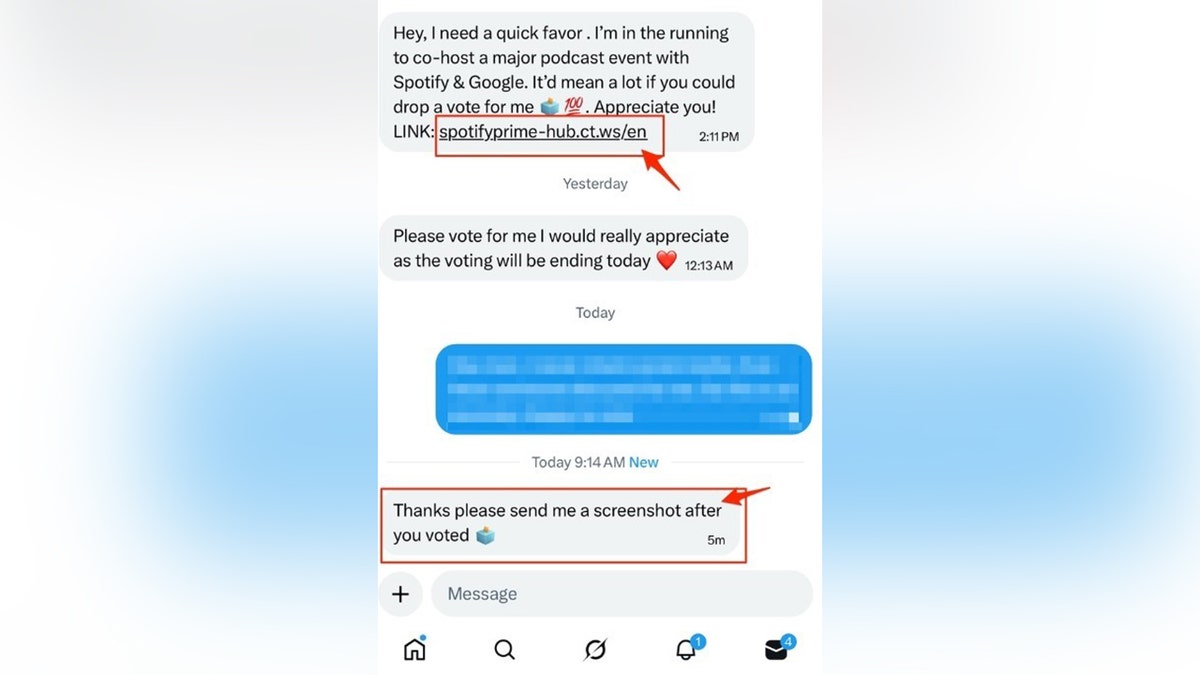
The scam unfolds in stages, starting with a friendly request and escalating to pressure and demands for a screenshot to confirm that you took the bait. (Kurt “CyberGuy” Knutsson)
What This Spotify Voting Text Scam Looks Like
The message claims that someone needs your vote to co-host a podcast event with Spotify and Google. Includes a link that looks official at first glance. But look closely.
The URL says: spotifyprime-hub.ct.ws
That’s not spotify.com. Big companies don’t host events on random domains like ct.ws. Scammers register cheap lookalike domains because they are easy to create and difficult to notice on a quick scroll. That small detail is the first warning sign.
What the fake voting page looks like
The site seems clean. It feels polished and official. It even claims to be powered by Google. Then it gives you three options:
- Continue with Instagram
- Continue with email
- Continue with X
That’s when you should stop. It’s not about voting. It involves collecting your login credentials.
ROBINHOOD TEXT SCAM WARNING: DO NOT CALL THIS NUMBER
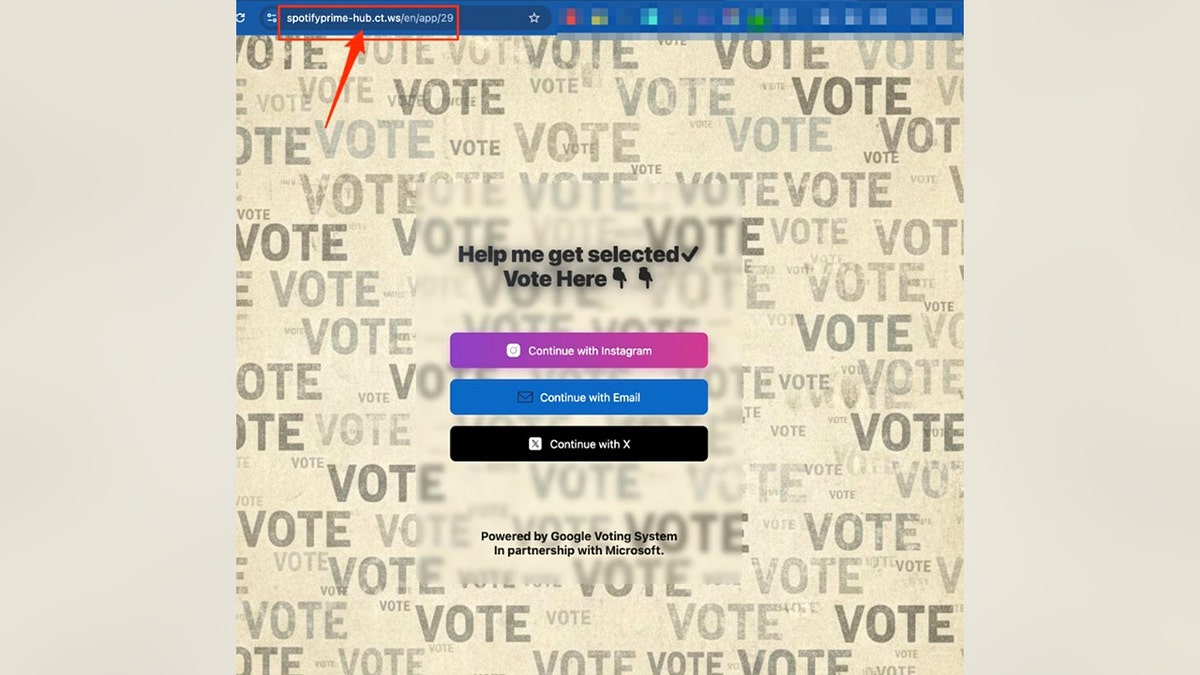
The fake voting page looks convincing, but the login buttons reveal that it is designed to steal your social media credentials. (Kurt “CyberGuy” Knutsson)
What does this scam reveal?
If you slow down and look closely, several clear warning signs immediately jump out.
1. The web address
The domain is wrong. It is not spotify.com or google.com. Instead, it uses a random address from a third party. That alone should stop you in your tracks.
2. The urgency
“Voting ends today.” “It would mean a lot.” Scammers rely on emotions and pressure. When you feel rushed, you stop analyzing. That’s the goal.
3. Login Buttons
A real voting page wouldn’t require your Instagram, email, or login
What really happened to someone who fell into the trap?
Here’s what one victim shared after clicking:
“So I got that Twitter DM from a friend last week. I logged in to vote for him. It didn’t work. Then a day later they hacked my account and locked me before I could change my password. I’m still locked out, and apparently he’s doing it to other people. Another friend got it from me and was also hacked and locked out. They’re trying to extort him to get access back. And today they tried to break into my bank accounts. It’s been miserable.”
That’s how fast it spreads. One login becomes 10. Tens become hundreds. It becomes a chain reaction.
What do scammers do after logging in?
The process is simple and brutal. First, enter your username and password. The scammer then logs into your account within minutes. They then change your password and recovery email. After that, they send the same “vote for me” message to all your contacts.
If you reuse passwords, they may try those credentials on email, banking, or shopping sites. This is a classic account takeover phishing scam.
Why do scammers ask for a screenshot?
This part is smart. After you “vote”, they ask you for proof in the form of a screenshot. Here’s why. First, confirm that you have completed the login. Second, screenshots may expose usernames, email addresses, or other visible details. Third, it keeps you engaged so you don’t immediately realize something went wrong. However, the damage usually occurs at the moment you enter your credentials.
“We are aware of phishing messages falsely claiming to be associated with Spotify and other brands,” a Spotify spokesperson told CyberGuy. “These messages are not from Spotify, are not related to any official Spotify events or activities, and do not occur on the Spotify platform. We encourage people to remain vigilant and avoid clicking on suspicious links.”
Meanwhile, a Google spokesperson pointed us to the company’s online guide to spotting and avoiding scams.
MICROSOFT ‘IMPORTANT’ EMAIL IS A SCAM: HOW TO DETECT IT
The Spotify logo is displayed on a screen on the floor of the New York Stock Exchange in New York on May 3, 2018. (REUTERS/Brendan McDermid/File Photo)
How to protect yourself from the Spotify voting scam
Now let’s talk about prevention.
1. Always check the full URL
Look beyond the brand name in the message. If the domain is not the company’s official domain, do not click.
2. Slow down when you feel urgency
Scammers manufacture pressure. True friends can wait.
3. Activate two-factor authentication (2FA)
Use app-based two-factor authentication (2FA) whenever possible. Add a critical barrier.
4. Use strong antivirus software on your devices
Strong antivirus software can block known phishing sites, warn you about suspicious links, and help prevent malicious downloads before damage is done. Get my picks for the best antivirus protection winners of 2026 for your Windows, Mac, Android, and iOS devices at Cyberguy.com.
5. Never reuse passwords
Use a password manager to generate unique passwords for each account. Check out the best expert-reviewed password managers of 2026 at Cyberguy.com.
6. Check directly with the person
If a friend sends something unusual, call or text them separately and ask if they intended to send it.
7. Check login activity regularly
Most social platforms allow you to review active sessions. If you see a login from an unknown location or device, log out of all sessions immediately.
What to do if you already clicked
- If you didn’t click, delete the message and tell your friend.
- If you clicked and entered your credentials, act fast.
- Change the password immediately.
- Allow two factor authentication.
- Review login activity.
- Change any other accounts that use the same password.
Time matters here, so don’t put it off.
Kurt’s Key Takeaways
There are no Spotify and Google podcast voting events running on a random ct.ws domain. The entire operation exists to steal social media credentials, hijack accounts, and spread further. It looks polished. It feels personal. That’s what makes it effective. The next time someone asks you for a quick vote, pause and inspect the link. That small moment of skepticism can prevent days of damage.
If a message came from someone you trusted, would you still stop to inspect the link before clicking? Let us know by writing to us at Cyberguy.com.
CLICK HERE TO DOWNLOAD THE News APP
Sign up to receive my FREE CyberGuy report
Get my best tech tips, urgent security alerts, and exclusive offers delivered straight to your inbox. Plus, you’ll get instant access to my Ultimate Guide to Surviving Scams, free when you join me CYBERGUY.COM information sheet.
Copyright 2026 CyberGuy.com. All rights reserved.
Related article

Kurt “CyberGuy” Knutsson is an award-winning technology journalist with a deep love for technology, gear and devices that improve lives with his contributions to News and News Business since mornings on “News & Friends.” Do you have any technical questions? Get Kurt’s free CyberGuy newsletter, share your voice, a story idea or comment on CyberGuy.com.